A friend needed to re-size his Windows NT OS partition from the default 4GB to 8GB. The easiest way to do this is with Linux, specifically with the GParted LiveCD.

GParted is a Gnome based partition editor which uses the libparted library from the popular GNU Parted package to do all it’s fancy partitioning stuff.
Current supported file systems are ext2, ext3, fat16, fat32, hfs, hfs+, jfs, linux-swap, ntfs, reiser-4, reiserfs, ufs and xfs. GParted lets you detect, read, create, grow, shrink, move ,copy, check and label your partitions. However, not all the features will work across all file systems. See table below.
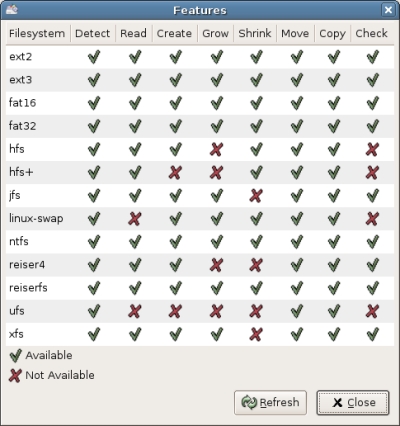
Where to get the LiveCD? SourgeForge of course!
Source: GParted