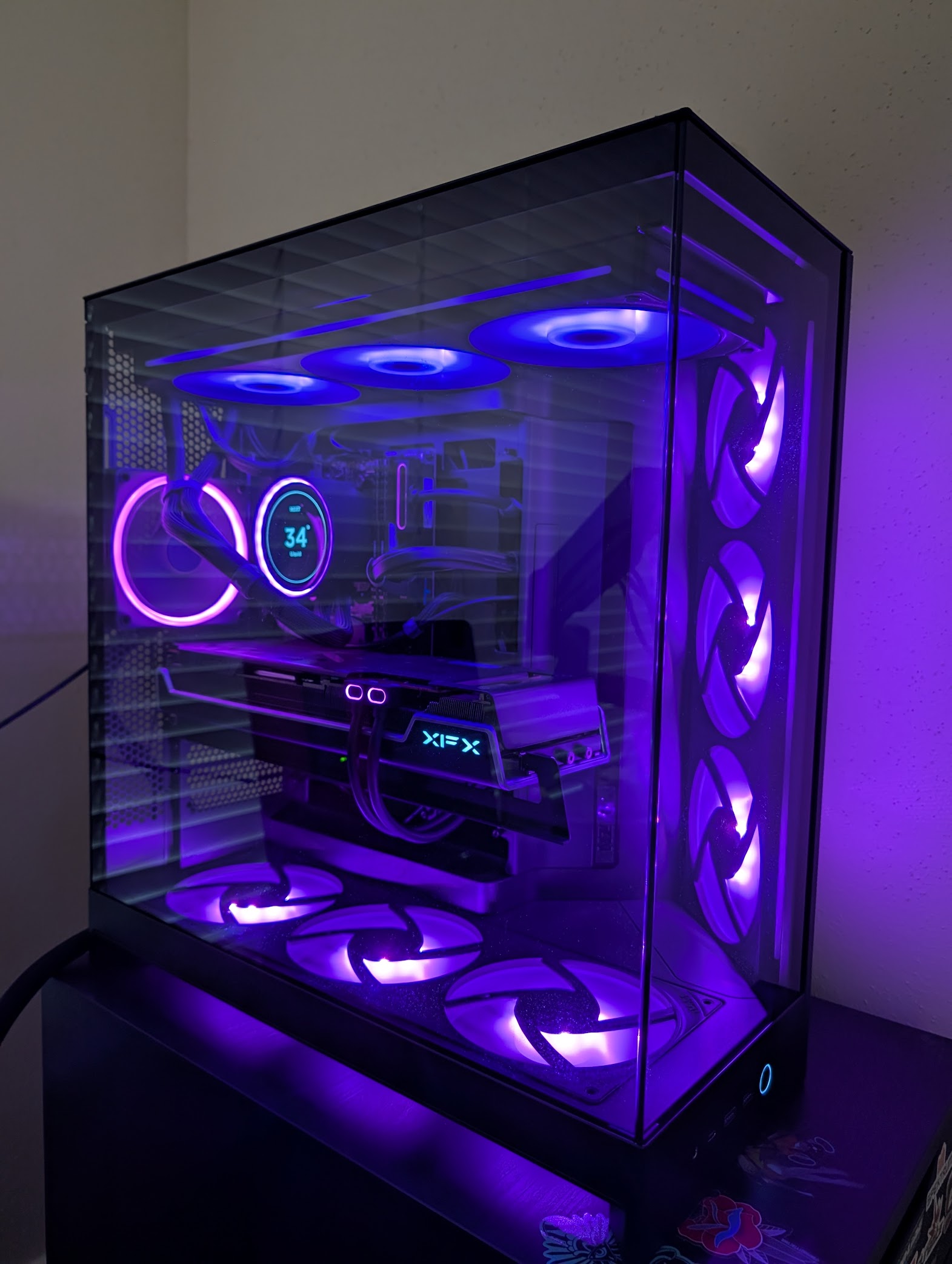
I recently wanted to match my PC RGB lighting to my desktop theme on Arch Linux. On Windows this is handled by manufacturer software (NZXT CAM, ASUS Armory Crate), but on Linux the tool of choice is liquidctl. Here’s how I got it working.
Hardware
- NZXT Control Hub
- NZXT Kraken 2024 Elite RGB (AIO cooler)
- NZXT F420 RGB Core fans (×2, connected to Control Hub)
- NZXT F120 RGB fan (connected to Control Hub)
- ASUS Aura LED Controller (motherboard ARGB/RGB headers)
Installation
liquidctl is available in the Arch repos:
sudo pacman -S liquidctl
Discovering Devices
liquidctl list
Device #0: NZXT Control Hub
Device #1: NZXT Kraken 2024 Elite RGB
Device #2: ASUS Aura LED Controller
Device #3: ASUS Aura LED Controller
Four devices show up. Device #3 is a duplicate — the ASUS Aura controller exposes two HID interfaces but only one accepts writes. Even with sudo, device #3 returns OSError('Could not write to device'). Safe to ignore it.
Initializing Devices
Before setting colors, devices need to be initialized:
liquidctl --match "ASUS" --pick 0 initialize
liquidctl --match "Control Hub" initialize
liquidctl --match "Kraken" initialize
The --pick 0 flag selects the first result when multiple devices match the same filter.
Identifying Control Hub Channels
The Control Hub showed three LED channels during init (led2, led4, led5), but I wasn’t sure which was which. I set each to a distinct color to identify them:
liquidctl --match "Control Hub" set led2 color fixed ff0000  # red
liquidctl --match "Control Hub" set led4 color fixed 00ff00  # green
liquidctl --match "Control Hub" set led5 color fixed 0000ff  # blue
Result:
led2— nothing (no device connected)led4— F420 RGB fan unit #1led5— F120 RGB fan
I then tried led1, led2, led3 and found the second F420 on led3. So the full map is:
| LED Channel | Device | Fan Channel | RPM | Physical Fans |
|---|---|---|---|---|
led3 | NZXT F420 RGB Core (unit #2) | Hub Fan 2 | ~600 | 3× 140mm (front or bottom) |
led4 | NZXT F420 RGB Core (unit #1) | Hub Fan 4 | ~600 | 3× 140mm (front or bottom) |
led5 | NZXT F120 RGB | Hub Fan 5 | ~585 | 1× 120mm (back) |
| — (Kraken) | AIO radiator fans | Kraken Fan | ~680 | 3× 140mm (top, LED uncontrollable) |
Setting Colors
ASUS Aura uses static mode:
liquidctl --match "ASUS" --pick 0 set sync color static E41C91
The sync channel sets all channels (ARGB + RGB) at once. You can also target led1 or led2 individually.
NZXT Control Hub uses fixed mode:
liquidctl --match "Control Hub" set led3 color fixed E41C91
liquidctl --match "Control Hub" set led4 color fixed E41C91
liquidctl --match "Control Hub" set led5 color fixed E41C91
Other supported modes for the Control Hub: off, fading, spectrum-wave, covering-marquee, super-rainbow.
Sampling the Color from My Wallpaper
Rather than picking a color by eye, I sampled the dominant colors from my wallpaper using ImageMagick:
convert wallpaper.jpg -resize 100x100 -colors 8 -format "%c" histogram:info: | sort -rn
This gave me the top colors by pixel count. The dominant purple was #5C3A8C and the hot pink accent was #E41C91 — I went with the hot pink.
Kraken 2024 Elite RGB — Partial Support
The Kraken 2024 is a newer device and liquidctl’s driver doesn’t support ring LED control yet (_color_channels is empty). However, the LCD screen is controllable:
# Show coolant temperature (default)
liquidctl --match "Kraken" set lcd screen liquid

# Display a static image (640×640)
liquidctl --match "Kraken" set lcd screen static /path/to/image.png

# Adjust brightness
liquidctl --match "Kraken" set lcd screen brightness 80
I kept it on liquid mode to show coolant temperature.
Persisting with systemd
Colors reset on reboot, so I created a script and systemd service to reapply them automatically.
~/.local/bin/set-rgb.sh:
#!/bin/bash

# Hot pink from wallpaper (3-milad-fakurian.jpg)
COLOR="E41C91"

# ASUS Aura LED Controller (device #2) — motherboard ARGB/RGB headers
liquidctl --match "ASUS" --pick 0 initialize
liquidctl --match "ASUS" --pick 0 set sync color static $COLOR

# NZXT Control Hub — led3/led4: F420 RGB fans, led5: F120 RGB fan
liquidctl --match "Control Hub" initialize
liquidctl --match "Control Hub" set led3 color fixed $COLOR
liquidctl --match "Control Hub" set led4 color fixed $COLOR
liquidctl --match "Control Hub" set led5 color fixed $COLOR

# NZXT Kraken 2024 Elite RGB — ring LEDs not supported by liquidctl yet
liquidctl --match "Kraken" initialize
liquidctl --match "Kraken" set lcd screen liquid
/etc/systemd/system/set-rgb.service:
[Unit]
Description=Set RGB LED colors
After=multi-user.target

[Service]
Type=oneshot
ExecStart=/home/danny/.local/bin/set-rgb.sh
RemainAfterExit=yes

[Install]
WantedBy=multi-user.target
Enable it:
sudo systemctl daemon-reload
sudo systemctl enable --now set-rgb.service
Summary
| Device | Controllable | Notes |
|---|---|---|
| ASUS Aura LED Controller | Yes | set sync color static <hex> |
| NZXT Control Hub (fans) | Yes | set ledX color fixed <hex> |
| NZXT Kraken 2024 LCD | Yes | set lcd screen liquid/static/gif |
| NZXT Kraken 2024 ring | No | Not yet supported in liquidctl v1.16.0 |
| NZXT Kraken 2024 AIO fans (top 3) | No | Connected to Kraken head, not Control Hub — same limitation as ring |